Cutting AI running costs without losing quality
The AI pilot is never the expensive part. A pilot is three weeks of enthusiasm and a bill small enough that nobody asks about it. The expensive part is month four, when the workflow runs every day, usage has quietly tripled, and someone in finance asks why a tool meant to save money became a line item nobody can explain.
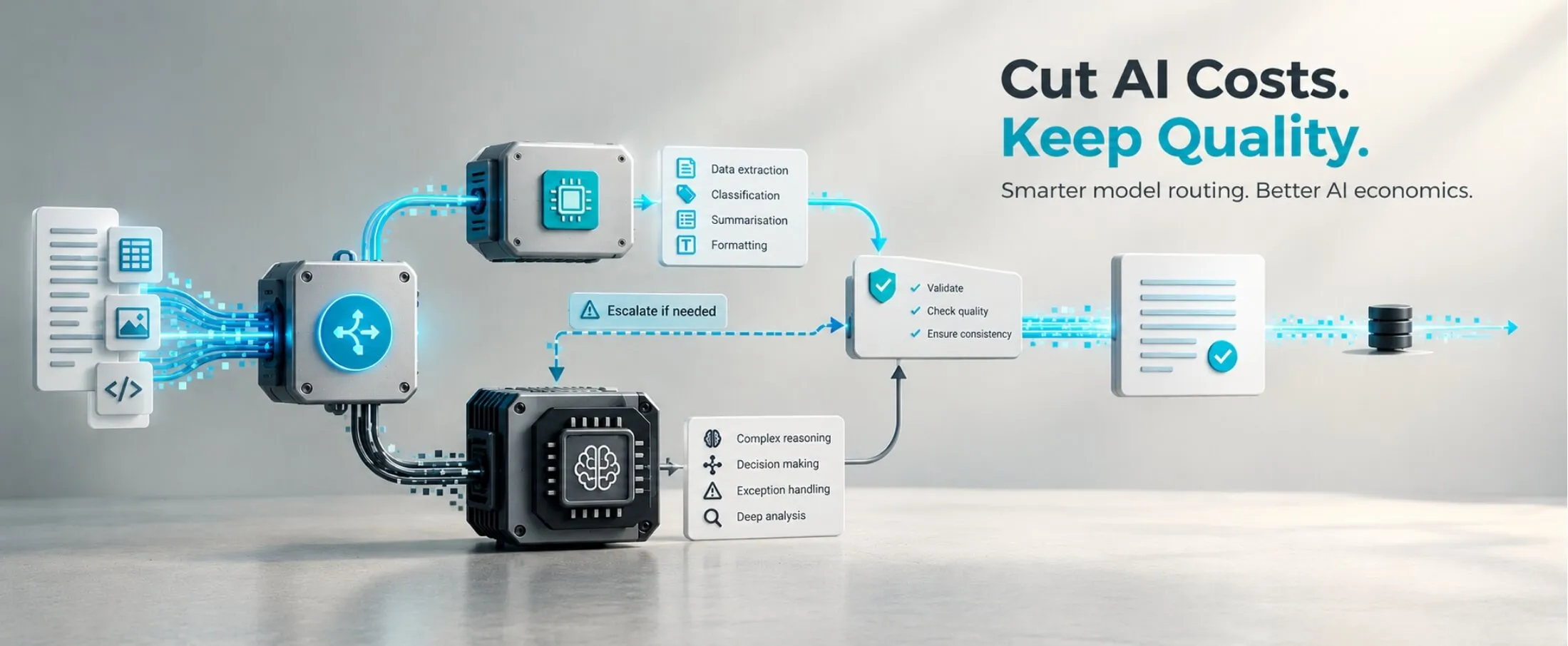
We build automation and agent systems from Kolhapur for clients in India, Canada and Europe — and we run a fair amount of it on ourselves. Earlier this year we looked hard at our own marketing automation: 14 workflows, running daily, doing research, drafting, repurposing and reporting. We were paying premium model prices for work that did not need a premium model. We moved 10 of the 14 to a smaller, cheaper model. Quality held. The bill fell by 50%.
This post is about making that decision deliberately, rather than in a panic when the invoice arrives.
The bill grows where nobody is looking
The numbers are consistent enough to be useful. McKinsey’s July 2026 analysis found that moving from isolated use cases to enterprise-wide adoption raises AI spend nearly fourfold, that 93% of surveyed respondents had exceeded their AI budgets, and that 20–30% of AI spend is typically unaccounted for, fragmented across vendors, tools and business units. It also cites Stanford research finding that token usage for the same task can vary by up to 30 times.
Futurum’s 2H 2026 survey of 1,636 enterprise technology decision makers puts 46.9% of organisations above their planned AI budget. The figure further down is the one I find more interesting: of those over plan, 17.2% respond by pausing or reducing the AI initiative itself.
That is the real risk. Cost is not only a finance problem. It is the most common reason a workflow that was working gets switched off.
Note what is not driving this. Per-token prices keep falling. Bills grow anyway, because usage grows faster than prices fall. The lever is not negotiating a better rate. It is designing consumption.
Quality is a property of the task, not of the model
Most teams pick one model and send everything to it. It is an understandable choice — one API key, one prompt style. It also means your cheapest task pays your most expensive rate.
Before changing anything, sort your workflows with three questions.
Does this need judgment, or only transformation? Extracting fields from an invoice, reformatting a report, sorting tickets into eight categories, summarising a document whose shape you already know — that is transformation. Writing a client proposal, diagnosing a failed workflow, deciding whether an exception needs a human: that is judgment. Transformation rarely needs a frontier model.
Is there a verifiable right answer? If a rule can check the output (the total matches the invoice, the JSON validates, the category is one of eight), a smaller model plus a validation step often beats a larger model with no check at all.
What does a mistake cost? A badly tagged blog draft costs five minutes. A wrongly posted journal entry in Tally costs an accountant an afternoon, and some trust.
Routing research supports the split. RouteLLM, from Berkeley and LMSYS, reported cutting costs by over 85% on MT Bench while retaining roughly 95% of GPT-4’s quality, with smaller reductions on harder benchmarks — about 45% on MMLU and 35% on GSM8K (the paper has the method). Read that honestly: savings are large when your task mix is easy-heavy and modest when it is not. Your own mix decides which you get.
What we actually did, step by step
This is the sequence we followed. It took about two and a half weeks, most of it waiting for data.
- Logged everything for two weeks and changed nothing. Per workflow, per run: input tokens, output tokens, model, cost. McKinsey’s unaccounted 20–30% is a visibility problem before it is a cost problem.
- Ranked by spend, not by importance. The three heaviest workflows accounted for 63%. The workflows everyone talks about in meetings were not the expensive ones.
- Built a small evaluation set per workflow — 20 to 30 real past runs with outputs we had been happy with. Most teams skip this, and it is the only thing that lets you downgrade on evidence instead of hope.
- Re-ran each eval set on a smaller model. First with the same prompt, then with the prompt rewritten for it: more explicit instructions, two or three worked examples, a stricter output format. A smaller model with a tightened prompt beat a larger model with a lazy prompt more often than I expected.
- Kept the large model wherever the eval dropped. Four of fourteen stayed: long-form drafting, anything that reaches a client unedited, exception handling, and the one workflow that has to read a very messy spreadsheet.
- Added an escalation path, not just a switch. Every downgraded workflow has a validation step, and a failure escalates that run to the larger model automatically. The cheap path is the default, not the only path — so a bad week degrades your bill, not your output.
- Capped output length, retries and agent loop depth. This is where costs run away quietly. An agent that retries five times against a malformed response costs five times, and nobody notices until month-end.
Where we landed: 10 of 14 on the smaller model, 48% savings, and an eval pass rate of 99% before and 98% after. Two were later moved back up when the eval set grew — the system working, not failing.
Three levers that do not involve changing models at all
Start with these three before changing any model.
Cache the part of the prompt that never changes. If every run sends the same style guide, schema or product catalogue, cache it. On Anthropic’s API a cache read is charged at 0.1× the base input price on most models, a 90% saving on that portion, while a cache write costs 1.25×, so it pays off only when the prefix is reused. Automation workflows reuse their prefix on every run, which is close to the ideal case.
Batch anything that does not need an answer this second. Nightly reports, bulk classification, backfills, scoring a queue. Anthropic’s Message Batches API charges 50% of standard prices within a 24-hour window, and the batch and caching discounts stack.
Send less context. Passing a whole document when three fields are needed is the most common waste I see in client systems. Retrieve first, then prompt. It usually improves accuracy too, because the model has less to be distracted by.
None of the three changes your output. They change your bill.
When the meter itself is the problem
One caveat from where we sit. For regulated or data-sensitive work (BFSI, healthcare, pharma, manufacturers who will not export process data), a workflow that calls a cloud API pays per task indefinitely and exports data while doing it. Running orchestration and the smaller models on the customer’s own infrastructure replaces the permanent meter with a one-time setup cost, and nothing leaves the building. It is not automatically cheaper: below a certain volume the cloud wins comfortably.
Takeaways
- Measure for two weeks before optimising, per workflow and per run. Then rank by spend, not by how important a workflow feels.
- Sort tasks into transformation and judgment. Transformation rarely needs your most expensive model.
- Build a 20–30 example eval set per workflow. Without one, every downgrade is a guess.
- Downgrade with a validation step and automatic escalation, so the cheap path is the default rather than the only option.
- Pull caching, batching and context trimming first — they cost nothing in quality.
- Cap output length, retries and agent loop depth. Runaway loops cause the worst surprises.
- Re-run your evals quarterly. Prices and capabilities both move.
If this is on your desk right now
The routing and cost-control pieces are going into v1 of our on-prem automation platform, due end of 2026. If you want to see how your own workflow mix would route, the beta waitlist is open — or book a 30-minute call and bring your two most expensive workflows.