Building Custom Software on a Budget: Expert Advice for Startups

Custom software development empowers startups to create unique solutions tailored to their specific business needs. These personalized applications streamline operations, automate processes, and give young companies a competitive edge in their market.
Building custom software presents significant challenges for budget-conscious startups:
- High development costs
- Limited technical expertise
- Resource constraints
- Time pressure to launch quickly
- Risk of overspending on unnecessary features
You can navigate these challenges by implementing strategic approaches to software development. This guide reveals practical methods to build effective custom solutions while maintaining budget control:
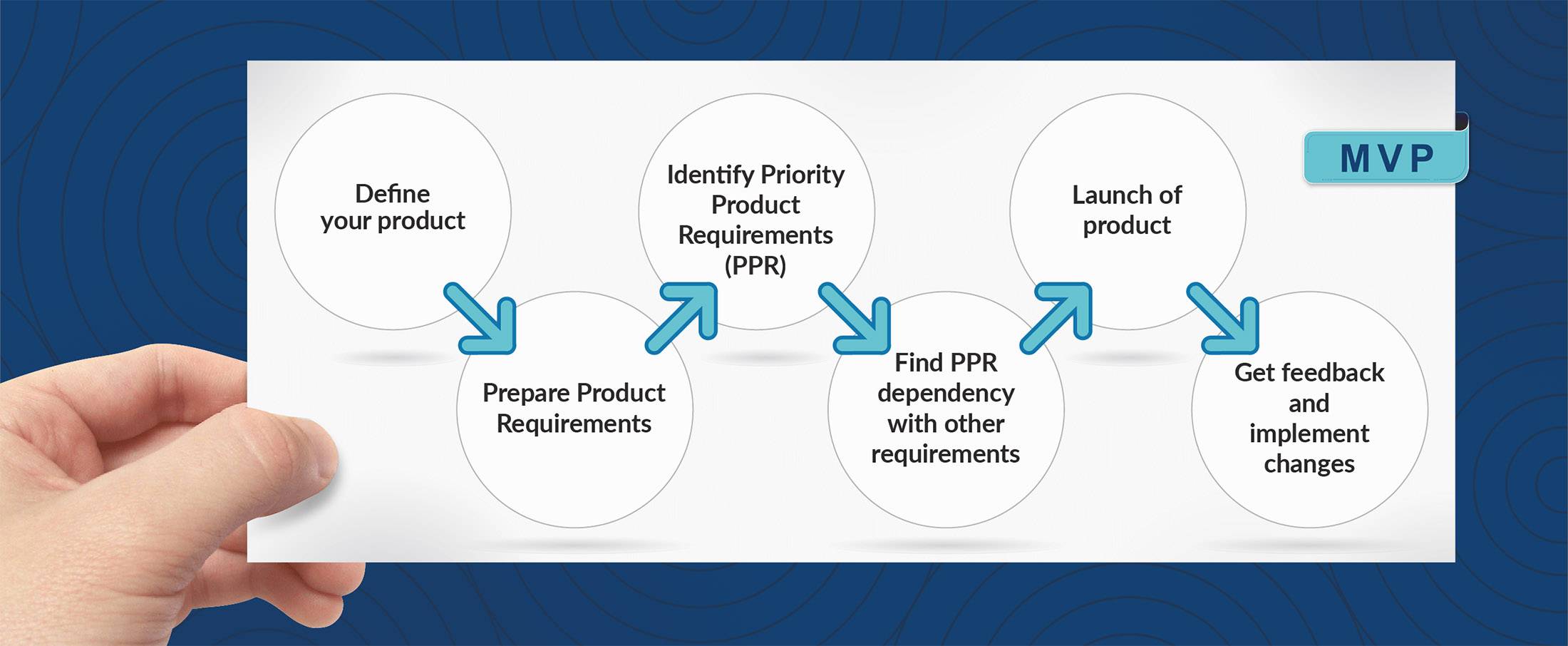
- Start with a Minimum Viable Product (MVP)
- Choose cost-effective technology stacks
- Implement agile development practices
- Select the right development team
- Use efficient project management tools
- Plan for scalability from day one
Ready to build your startup’s custom software without breaking the bank? Let’s explore each strategy in detail to help you create a powerful, budget-friendly solution that drives your business forward.
Understanding Custom Software Development for Startups
Custom software development creates unique applications designed to address specific business requirements. Unlike off-the-shelf solutions, these tailored software solutions match your startup’s exact workflows, processes, and growth trajectory.
Your startup needs distinct software features to:
- Match Your Business Model: Built-to-order solutions adapt to your unique operational methods
- Scale With Your Growth: Custom applications expand alongside your evolving business needs
- Integrate Seamlessly: Direct compatibility with your existing tools and systems
- Protect Your IP: Proprietary solutions safeguard your competitive advantages
Custom software delivers targeted benefits for startup operations:
- Streamlines specific workflows unique to your business
- Automates repetitive tasks based on your processes
- Reduces manual work through tailored automation
- Creates efficiency in your particular market niche
The right custom solution transforms startup challenges into advantages:
- Process Optimization: Eliminates bottlenecks in your specific workflow
- Data Management: Handles your unique data requirements
- User Experience: Creates interfaces matched to your team’s needs
- Market Differentiation: Builds features your competitors don’t have
Custom development aligns technology with your business strategy, turning your startup’s distinctive approach into a competitive edge through purpose-built digital tools.
1. Planning Phase: The Foundation for Budget-Friendly Development
Project planning is the key to successful software development. A well-organized planning phase can save you up to 30% of your development costs by avoiding costly mistakes and scope creep.
Essential Planning Components:
- Define clear business objectives and success metrics
- Create detailed technical specifications
- Map user personas and their journey
- Set realistic timelines and milestones
Discovery sessions bring stakeholders together to uncover potential roadblocks and clarify application requirements. These sessions help you:
- Identify technical constraints
- Understand user pain points
- Define feature priorities
- Establish communication protocols
Documentation Best Practices:
- Create user flow diagrams using tools like Miro or Lucidchart
- Develop detailed user stories
- Establish acceptance criteria for each feature
- Document API specifications and data models
A comprehensive project scope document enables accurate cost estimation and resource allocation. Your scope document should include:
- Feature breakdown structure
- Technical requirements
- Integration points
- Testing requirements
- Deployment strategy
2. Starting Small: Embracing Minimum Viable Product (MVP) Strategy
An MVP represents your software’s core functionality – the essential features needed to solve your users’ primary problems. This lean approach helps you validate your business concept while keeping development costs under control.
Key Benefits of MVP Development:
- Reduced initial investment
- Faster time-to-market
- Early user feedback collection
- Risk minimization
Your MVP should focus on one primary function that addresses your target market’s most pressing need. For example, if you’re building a project management tool, start with task creation and assignment capabilities before adding time tracking or billing features.
Prioritization Strategy:
- List all desired features
- Rate each feature’s importance (1-5)
- Identify dependencies between features
- Select features scoring 4-5 for MVP
- Move remaining features to future releases
This strategic approach allows you to test your product’s market fit with real users. Their feedback guides your development roadmap, ensuring you invest in features your customers actually want and need.
3. Prototyping and Proof of Concept for Early Validation
Proof of Concept (POC) and prototypes serve different purposes in your software development journey.
- A POC tests the technical feasibility of specific features, answering the question “Can we build this?” It’s a simplified version focusing on functionality rather than appearance.
- Prototypes create visual representations of your software’s interface and user flow. You can build these using tools like Figma or Adobe XD to demonstrate the user interface design, map out navigation paths, and showcase interactive elements.
Benefits of Proof of Concept (POC)
Here’s how POCs benefit your development process:
- Validate complex technical requirements
- Test integration capabilities with third-party systems
- Identify potential technical roadblocks early
Importance of Prototypes
The feedback you gather from prototypes helps refine your design before writing any code. Users can interact with your prototype, providing insights about:
- Usability issues
- Design preferences
- Feature accessibility
By investing time in POCs and prototypes, you reduce development risks and avoid costly changes during later stages. This approach allows you to validate both technical feasibility and user experience elements while maintaining budget control.
4. Agile Methodology and Early Testing for Cost Efficiency
Agile development practices enable startups to adapt quickly while maintaining cost control. You’ll break down your development process into short sprints, each delivering working software components. This approach allows you to:
- Respond to market changes without extensive rework
- Validate features with real users during development
- Adjust priorities based on immediate feedback
- Reduce waste by identifying non-essential features early
Early testing integration serves as your safety net against costly bugs. By implementing automated tests from day one, you’ll catch issues before they compound:
- Unit tests verify individual code components
- Integration tests ensure different parts work together
- End-to-end tests validate complete user workflows
The iterative feedback loop creates a continuous improvement cycle:
- Build small features
- Test immediately
- Gather user feedback
- Make necessary adjustments
- Move to the next feature
This systematic approach helps you maintain high-quality code while keeping development costs predictable. Your team can focus on delivering value rather than fixing accumulated technical debt.
5. Hiring Smart: Choosing the Right Development Team Within Budget
Selecting the right development team can make or break your custom software project. Let’s examine your three main options:
1. Freelance Developers
- Lower hourly rates ($25-$100/hour)
- Flexible hiring terms
- Direct communication
- Risk of sudden project abandonment
- Limited availability for maintenance
- Potential quality inconsistencies
- Deep understanding of business goals
- Real-time collaboration
- Full control over development
- High fixed costs (salaries, benefits)
- Additional overhead expenses
- Time-consuming recruitment process
- Proven development processes
- Comprehensive skill sets
- Reliable project management
- Structured communication
- Higher hourly rates ($75-$200/hour)
- Built-in quality assurance
Your budget and project complexity should guide your choice. Small projects with clear requirements work well with freelancers. Complex, long-term projects benefit from agency partnerships. In-house teams suit companies with ongoing development needs and available resources for team management.
Consider starting with a hybrid approach – hire a technical lead in-house to manage external developers. This strategy combines cost efficiency with quality control while maintaining project oversight.
6. Selecting the Optimal Technology Stack
Your technology stack decisions shape your startup’s development speed, scalability potential, and long-term costs. Here’s what you need to consider:
1. Speed vs. Scalability
- Popular frameworks like React, Django, or Ruby on Rails offer rapid development capabilities
- Node.js and Python provide excellent performance for quick MVP launches
- Golang and Rust deliver superior scalability for high-performance requirements
2. Talent Pool Assessment
- JavaScript developers are abundant and typically cost-effective
- Specialized languages like Scala might require higher compensation
- Local talent availability affects your hiring timeline and budget
3. Community Support Impact
- Large communities (React, Angular) provide:
- Free learning resources
- Ready-made components
- Quick problem-solving support
- Regular security updates
4. Cost Considerations
- Open-source technologies reduce licensing fees
- Cloud services like AWS, Google Cloud offer pay-as-you-go models
- Modern containerization tools (Docker, Kubernetes) streamline deployment
- Established frameworks minimize custom development needs
Your stack selection directly impacts maintenance costs – choosing well-supported, mainstream technologies helps you avoid technical debt and expensive rewrites down the road.
7. Using Project Management Tools for Effective Collaboration
Using the right project management tools can make your software development process smoother and help you keep costs in check. Here’s how you can use these tools to work together more efficiently:
1. Communication Platforms
- Slack enables real-time messaging with dedicated channels for different project aspects
- Zoom facilitates face-to-face meetings, screen sharing, and remote pair programming sessions
- Microsoft Teams combines chat, video calls, and file sharing in one platform
2. Documentation Management
- Notion serves as a central knowledge hub with customizable workspaces and templates
- Confluence offers structured documentation with version control and team collaboration features
- GitHub Wiki provides technical documentation directly linked to your codebase
3. Agile Project Tracking
- Jira helps implement Scrum with sprint planning and backlog management
- Trello’s Kanban boards visualize work progress with drag-and-drop simplicity
- ClickUp combines task management, docs, and time tracking in a unified workspace
These tools often offer free tiers or startup-friendly pricing plans. Select tools that integrate well with each other to create a seamless workflow. Your chosen stack should scale with your team size while maintaining clear communication channels and transparent project progress tracking.
8. Ensuring Quality Through Comprehensive Testing Practices
Quality assurance doesn’t have to break your budget. You can implement a robust testing strategy by focusing on three key areas:
1. Automated Testing Implementation
- Unit tests verify individual code components
- Integration tests check interactions between different modules
- UI tests simulate real user interactions
- Test automation tools like Jest, Selenium, or Cypress reduce manual effort
2. Strategic Code Reviews
- Pair programming sessions catch bugs early
- Pull request reviews ensure code quality
- Static code analysis tools identify potential issues
- Regular code review meetings foster knowledge sharing
3. Cross-Platform Testing
- Browser testing tools like BrowserStack or LambdaTest
- Device labs for mobile app testing
- Virtual machines for operating system compatibility
- Automated cross-browser testing scripts
A well-structured testing approach saves money by identifying issues before they reach production. You’ll spend less time fixing bugs and more time building features your users need. The key is to start with essential tests and gradually expand your testing coverage as your product grows.
9. Designing User-Centric UI/UX Within Budget Constraints
User research is essential for creating cost-effective UI/UX designs. Here are some methods you can use to gather valuable insights:
- Online surveys
- User interviews
- Competitor analysis
- Analytics data review
You don’t need expensive tools to create an intuitive navigation structure. Instead, focus on these proven principles:
- Clear visual hierarchy with consistent heading styles
- Prominent placement of key features
- Predictable button locations
- Familiar design patterns users already understand
Conducting usability tests early on can help you identify interface issues before they become costly problems. Here are some budget-friendly testing methods to get started:
- Guerrilla Testing: Ask friends, family, or potential users to test your interface
- Remote Testing Tools: Use affordable platforms like UsabilityHub
- A/B Testing: Compare different design versions with free tools like Google Optimize
- Heatmap Analysis: Track user behavior with tools like Hotjar’s free tier
Make sure to document user feedback systematically – this data will be invaluable for future iterations and will help you prioritize design improvements that truly matter to your users.
10. Planning for Scalability from the Start
Scalable architecture starts with modular software components. You can break down your application into independent modules that handle specific functions. This approach lets you:
- Update individual components without affecting the entire system
- Add new features by plugging in additional modules
- Replace outdated modules with improved versions
Data Structure Optimization
Your choice of data structures directly impacts performance as user numbers grow. Consider:
- Implementing caching mechanisms for frequently accessed data
- Using indexed database queries for faster search operations
- Adopting NoSQL databases for handling large-scale unstructured data
Cloud Infrastructure Benefits
Cloud platforms provide cost-effective scaling solutions:
- Pay-as-you-go pricing models reduce upfront infrastructure costs
- Auto-scaling features adjust resources based on real-time demand
- Built-in load balancing distributes traffic efficiently
- Geographic distribution through multiple server locations improves response times
You can start with basic cloud services and expand as needed. AWS, Google Cloud, and Azure offer startup-friendly pricing tiers with essential services for new applications.
11. Post-Launch Support, Performance Monitoring Strategies, Security Measures And Compliance Considerations On A Budget
Launching your custom software marks the beginning of a critical phase: maintaining and securing your application while staying within budget constraints. A strategic approach to post-launch operations helps startups manage costs without compromising security or performance.
Essential Maintenance Planning:
- Schedule bi-weekly security patch updates
- Implement automated system health checks
- Create a prioritized backlog for feature improvements
- Set up automated backup systems
Cost-Effective Performance Monitoring:
- Use New Relic’s free tier for basic application monitoring
- Set up Datadog alerts for critical metrics
- Monitor server response times and error rates
- Track user engagement patterns
Security Implementation:
- Enable SSL encryption for data transmission
- Implement role-based access control
- Use secure password hashing algorithms
- Regular security vulnerability scans
Budget-Friendly Compliance Measures:
- Document all data handling procedures
- Create compliance checklists for relevant regulations
- Maintain audit trails for system access
- Store user consent records systematically
Customer Feedback Integration:
- Set up in-app feedback collection tools
- Create automated bug reporting channels
- Track user behavior analytics
- Prioritize fixes based on user impact
The key to successful post-launch management lies in automation and proactive monitoring. Tools like Sentry offer free plans for error tracking, while GitHub’s security features help maintain code integrity. Implementing these measures early prevents costly security breaches and compliance violations while ensuring smooth application performance.
Your monitoring strategy should focus on critical metrics that directly impact user experience. Track server response times, error rates, and user engagement patterns to identify potential issues before they affect your customers.
Leveraging Advanced Technologies To Enhance Value Cost-Efficiently
Advanced technologies can deliver significant value without breaking your startup’s budget. Here’s how you can harness their power strategically:
AI-Driven Features
- Use pre-trained AI models to add smart features
- Implement chatbots for customer support automation
- Add personalization through recommendation engines
- Integrate natural language processing for data analysis
- Reduce development time by using existing APIs
- Pay-as-you-go pricing models for better cost control
- Access enterprise-level features at fraction of cost
- Quick integration with third-party services
Microservices Architecture Advantages
- Build and update individual components independently
- Scale specific features based on actual usage
- Reduce maintenance costs through isolated services
- Enable faster deployment of new features
Strategic Implementation Tips
- Start with essential AI features that directly impact ROI
- Choose APIs with transparent pricing and good documentation
- Build microservices for core business functions first
- Test performance impact before full implementation
You can leverage these technologies incrementally – adding features as your budget allows. Many cloud providers offer startup-friendly pricing tiers for AI services. Popular APIs like Stripe for payments or Twilio for communications provide free tiers perfect for testing. Microservices architecture lets you start small and expand systematically as your user base grows.
Collaborating Effectively With Development Partners
Selecting the right development partner shapes your startup’s software development journey. A strong partnership combines technical expertise with deep understanding of your business vision.
Key Partner Selection Criteria:
- Track record with similar startup projects
- Cultural fit and communication style alignment
- Transparent pricing and flexible engagement models
- Technical expertise in your required stack
- Proven project management methodologies
Your development partner should act as an extension of your team. Regular sync-ups, shared project tools, and clear communication channels create seamless collaboration.
Establish Clear Communication Frameworks:
- Set up dedicated Slack channels for different project aspects
- Schedule weekly progress reviews
- Create shared documentation repositories
- Define escalation paths for critical issues
- Implement regular feedback loops
Tips for Successful Partnership:
- Share your business context and long-term vision
- Define success metrics together
- Maintain open dialogue about budget constraints
- Document all decisions and changes
- Build trust through transparency
A strong development partnership balances cost-efficiency with quality delivery. Your partner should proactively suggest solutions that align with your budget while meeting technical requirements.
Remember to validate potential partners through client references and portfolio reviews. The right partner becomes invested in your success, offering strategic guidance beyond pure development work.
05 Aug 2025
Related Posts

AI Code Review Bottleneck: Why PRs Slow Down

1 Breach, 3 Security Firms Burned

Your AI Tool Reads Too Much

$2M Risk: One API Ban Can Kill You

Anthropic Stores Every Prompt You Send — And May Be Lying to Yo
Microsoft’s AI Tools Were Hacked. Is Yours Next?

Why Uber Capped AI Coding Tools

Microsoft Build 2026: What Project Solara and AI Agent PCs Mean f

GitHub Copilot Just Got Expensive: Here’s What Smart ISVs A

Every AI Lab Is Now an Agent Lab — Here’s What ISVs Must

Google Says the Age of AI Agents Is Here: What SMB Owners Should

Why Your AI Subscriptions Are About to Blow Up Your Budget (And W

Building an AI Team for the Shop Floor

Why Zero Data Retention Will Make or Break Your AI Development St

Why Zero Data Retention Will Make or Break Your AI Development St

Claude Code Source Leak Reveals the Secret Architecture Behind AI

Supply Chain Attacks Are Exploding: How AI-Powered Security Scann

Gemma 4 vs Microsoft’s New Models: Which AI Stack Will Win the

Why Your Startup Is Overpaying 300% for AI (And How to Fix It)

Why the LiteLLM Supply Chain Attack Changes Everything for AI Dev
EdTech Development: Creating Engaging Learning Platforms

Integrating Multiple Systems? How Custom Software Can Break Down

Staff Augmentation vs Project Outsourcing: Which Model Fits Your

Building an App? 5 Mistakes to Avoid in the Early Stages

DevOps in Custom Software: Accelerating Delivery and Quality —

UI/UX Best Practices for Custom Web Applications — What They Re
Mobile App Development Trends 2026: AI, IoT, and Beyond

Why Choosing the Right Tech Stack Matters

MVP Development: Focusing on Core Features for Success — and Ho

Inbox Under Threat: How Human Verification Can Protect Email From

How to Enhance User Engagement with These Mobile App UX Hacks

10 Signs Your Business Needs Custom Software (And Not Off-the-She

From Concept to Creation: Understanding Product Engineering Servi

Save Time and Money with Effective Prototyping in Software Projec

Securing Your Application: Best Practices from Day 1

Why Custom Software Is a Smart Investment for SMBs

Custom Software for Healthcare: Innovations That Meet Compliance

FinTech Software Development: Security and Compliance Best Practi

Understanding HIPAA Compliance in Healthcare App Development: A C

Breaking the Fix-It Loop – Why Patching Alone Slows Growth

Why ‘Technical Feasibility’ is Crucial Before Buildin

Can AI Replace Designers? The Real Impact on Creative Design Team

Redesigning Hiring for the Underserved – A Blueprint for Talent

Agile vs Waterfall: How to Decide the Best Fit for Your Project

Web App vs Mobile App: How to Choose the Right Platform for Your

Behavioral Traits – The Hidden Engine of Retention

UX as Emotional Infrastructure

Mock Interviews, Real Confidence: Preparing Beyond the Resume

Rapid Prototyping: How AI is Revolutionizing the Design Process i

What If Job Matching Measured Mindsets, Not Just Degrees?

Why Job Boards Fail in Developing Economies

Transforming Software: How AI is Making It More User-Friendly and

Leave Management System – Admin & HR Controls

When Code Bows to Culture

The Role of AI in Super High Paced Development: Transforming the

Who is Soham Parekh?

Leave Management System – Instant Leave Decisions

Leave Management System – Employee Leave Flow

AI-Based Error Log Analyzer: A Smarter Way to Handle Infrastructu

Why Pictures (and Sounds) Speak Louder Than Tables

Leave Management System – Mobile First

Leave Management System – Real Cost

Leave Management System

Keeping Workers Safe: How Computer Vision Revolutionizes Industri

The AI Whisperer: Unmasking Public Opinion with Sentiment Analysi

EHR Interoperability: Enhancing Care Coordination

EHR Security Best Practices: Safeguarding Patient Data

The Benefits of Implementing EHR Systems in Healthcare

Big Data Trends in Healthcare

Business Intelligence for Healthcare Industry

How Mobile Apps Are Transforming Healthcare

Practical Use Cases of RPA in the Healthcare Industry
Google Core Update January 2020
Health Information Exchange (HIE): A Primer

How Wearables are Helping to Monitor Patients
Best Practices for Successful EHR Data Integration

Importance of Sustainable Last-Mile Delivery Options in Building

Applications of 3D Printing in Healthcare

Application and Advantages of Artificial Intelligence and Machine

What is Technical SEO?

Healthcare Tech Space Review 2019

What is AWS Lambda? & AWS Lambda Use Case
Digital Marketing Strategies for Real Estate Agents

Web API and HL7 FHIR – The Future of Interoperability
Why FHIR is Better?

Real Estate Tech Space Review 2019

Improving Patient Care with Chronic Care Management
10 Healthcare Tech Trends to Follow in 2020

10 Real Estate Tech Trends to Follow in 2020
iBuyer: Disruptive Business Model or a Passing Fad?

Symptom Checker: Your personal mhealth app
Facebook for Real Estate Marketing
Use cases for Big Data in Real Estate
Can Real Estate be Uberized?
Using Predictive Analysis for Better Management of Patient Emerge
Challenges in Aggregating MLS Data

Home Navigation for the Visually Challenged

Uberization of Healthcare

Using mHealth for monitoring symptoms in children
Pinterest for Real Estate Marketing

Advancement of Voice Inputs over Text in Healthcare

Instagram for Real Estate Marketing
Chatbots in Healthcare
Why brokers are moving to custom solutions rather than using gene
Virtual Hospitals: Future of Healthcare

What Happens in Vegas, Stays in Vegas – Well, not if you ha

8 Healthcare Tech Trends to watch out for in 2019

6 Reasons Why Telemedicine Hasn’t Taken Off

5 Real Estate Tech Trends to watch out for in 2019
How MLS APIs Can Improve Your IDX Performance

How can Realtors generate quality leads using Social Media?

What is the difference between RETS and RESO Web API?
IoT for Healthcare

3D Home Tours – A must have in today’s world?

3D Printing in Real Estate

Pros & Cons of integrating RETS in your website

Blockchain: Opportunities for Healthcare

Pros & Cons of Integrating IDX in your Website
4 Reasons why you need to integrate RESO compliant MLS
Docker Selenium Grid for Parallel Test Execution
IDX vs RETS vs MLS vs RESO

How is AI Transforming Healthcare
The Future of Virtual Reality in Healthcare

Smart Contracts in Real Estate using Blockchain

How To Choose The Right CRM For Your Business

Best UX Design Practices for Healthcare Applications
FHIR Integration for Better Patient Engagement
IoT for SMART Real Estate
AI to Automate Pre-Showing Process

Best Practices for Healthcare Data Governance

Will Virtual Reality in Real Estate Replace Property Showing?

A Secure Web is Here

Will Uber-ized Property Showing Gain Momentum?

Future of Cloud Computing in Healthcare

5 Real Estate Tech Predictions for 2018

Key Takeaways From Inman Connect NYC 2018 #ICNY
DevOps is the future of the software development

9 Proven Ways to Optimize Google Page Speed

3 Ways to Generate More Real Estate Sales Leads
Introduction to Elasticsearch
5 Real Estate Tasks to Automate

MLS Data: Roadblock for RealTech?

Part II – Writing Better, Faster and Easy to Maintain Mobil
Meteor Security Checks

3 Reasons Why You Need App Prototype For Your Idea

Apple Events September 2017

Part I – Writing Better, Faster and Easy to Maintain Mobile